

QSKing 5D is the stand-alone Windows edition of QSKing QTO. Instead of working inside Revit, it reads the IFC models your consultants issue. It measures with the same rules as QSKing QTO for Revit, and it uses the same QTO Schedule, Workbook and Export BQ, so everything in Chapters 4 to 6 applies to both. This page shows where things are in QSKing 5D.
The window
- Quick-access toolbar (top left): New, Open, Save and Run QTO.
- File menu: New, Open…, Save, Save As…, Licence…, Check for updates, About QSKing 5D and Exit. A project is saved as one
.qs5dfile with its links, Run QTO choices and Workbook. - QSKing 5D ribbon: the same command groups and icons as the QSKing QTO tab in Revit (table below).
- 3D view: the linked IFC models together, with 3D / Top / Front / Back / Left / Right views. Left-drag to orbit, wheel to zoom, wheel-drag or right-drag to pan, click to select, Ctrl+click to add, Esc to clear.
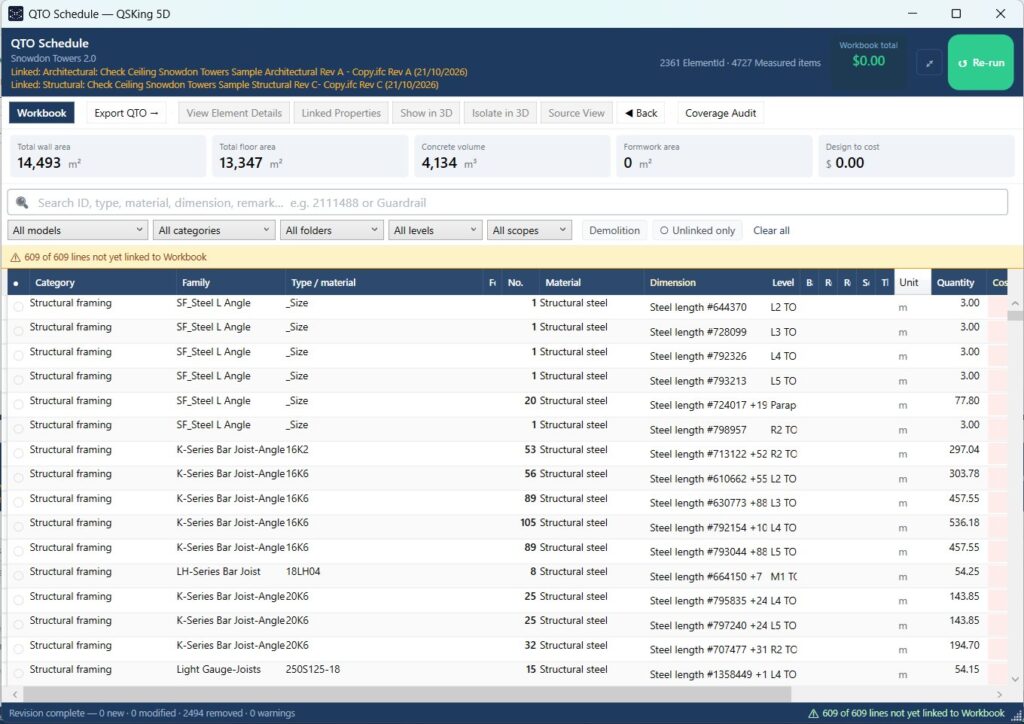
- QTO Schedule: docked under the 3D view, exactly as in Revit. ✕ hides it (Extraction → QTO Panel brings it back), ⤢ opens it in its own window for a second screen, and Re-run measures again with the same choices.
- Status bar: messages, loading progress and which models are loaded.
The ribbon
| Group | Command | What it does |
|---|---|---|
| Extraction | Run QTO | Choose what to measure, then measure the linked models (see 4.1.2). |
| Extraction | QTO Panel | Show or hide the QTO Schedule. |
| Settings | QS Settings | Coming to QSKing 5D. The choices will be saved in the project, because an IFC file cannot be written to. |
| Manual | Pick & Choose, Calibrate View | Coming to QSKing 5D. |
| QA | Select Linked | Show the properties of the elements you click in the 3D view. |
| QA | Model Audit | Check every category in the linked models against the Run QTO choices. |
| Output | Export BQ | Export the Workbook BQ, or the QTO Schedule, to Excel. |
| Links | Manage Links | Load, reload or remove the IFC model of each discipline (see 4.1.1 and 4.1.2). |
| Links | Revisions | The revision register: every issue of each model and what it changed. |
| View | 3D view | Show or hide the 3D view. |
What is different from Revit
- Models are IFC files. Manage Links holds one IFC per discipline: Architectural, Structural, HVAC, Electrical and Plumbing. Section 4.1.1 explains how consultants should export them.
- Nothing is written back to the model. Choices that Revit stores in the model are saved in the
.qs5dproject instead. - Licence. QSKing 5D works fully for 30 days from the first time you start it, with no licence key needed. After that it is view-only until a licence key is entered (File → Licence…). Download it free from qsking.com.
Try this on your own models
Everything in this book works in QSKing QTO for Revit® and in QSKing 5D, which measures your consultants’ IFC models with the same rules. Download QSKing 5D free for 30 days: Windows 10/11, no card needed.