

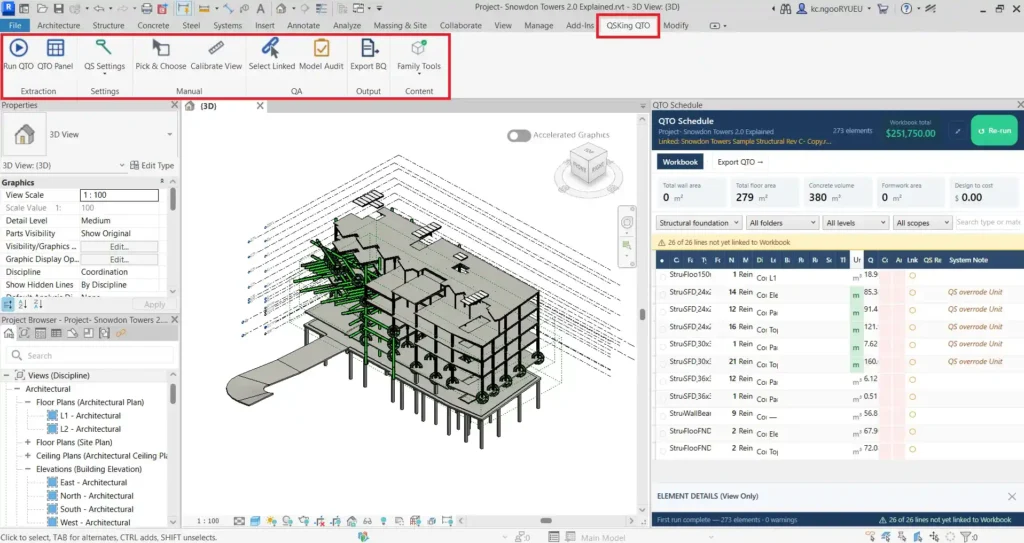
This is where the 5D BIM Cost Management workflow will come into play. Select QSKing QTO menu will show up 6 command groups that you will be using to auto-extract / manually measure the quantities for your cost management. Each of the commands will be explained in great details in Chapter 4. they are:
Extraction

This command allows you to auto-extract the quantities according to its Category. It also auto populate the QTO Schedule.

This command enables you to open and close the QTO Schedule view.
Settings

This command allows you to set formwork related measurement rules according to ANZSMM should the modeler did not model to the way you need for 5D.
There are a total of 9 settings:
- Set SubType
- Set Formwork Type
- Set Excavation RL
- Set Level
- Set External Wall
- Set Formwork Staging
- Set EdgeDownstand Formwork
- Set External Finish
- Set Paint
Manual

This command enables you to manually derive basic units of measurement like Count (no.), Linear (m), Area (m2), Volume (m3) when auto-extraction is not possible and creates a line items on QTO Schedule..
You can use it to measurement 2D pdf file, images, etc. like the way you used to do on-screen measurement.

All read-only file like pdf, images need to be calibrated before on screen measurement using Pick & Choose.
QA

The Select Linked command lets you easily pick any element in a linked model and display its details in the QTO Info panel.
This is a breakthrough in handling linked models.

The main function this Model Audit is to ensure that all model elements have been extracted for 5D purpose by flagging those non extracted elements / Categories.
Output

This commands enable printing of all line items that has been arranged in the required format like Elemental, Trades or Work Breakdown Structure (WBS).
It exports all the quantities and pricing to Excel format for further usage.
Content

Family tools comprising 2 functions. They are Creates QTO Family and Verify Content.
Creates QTO Family is normally come into picture when there the Generic models come with the volumetric quantities which is not suitable for 5D.
As for the Verify Content function, it is to ensure that the newly created QTO family has the required dimensions for 5D that been generated using Creates QTO Family function.